432 Hz Guitar Tuner








🎶 Tune by ear 🎶
What is a guitar tuner?
A guitar tuner helps you bring each string to the correct pitch so your instrument sounds clear, balanced, and in tune. It listens to the note you play, identifies the closest pitch, and shows whether you need to tune up, tune down, or if the string is correctly tuned.
This online tuner uses your device’s microphone to analyse your sound in real time, making accurate tuning quick and easy for both beginners and experienced players.
How to use the tuner
Click Start tuner and allow microphone access. For best accuracy, use the tuner in a quiet environment and keep your guitar close to your device.
Pluck one string at a time. The tuner will display the detected note and indicate whether the string should be tightened (tune up) or loosened (tune down). Turn the tuning peg slowly, checking the display after each adjustment, until the string reaches the correct pitch. Repeat for all six strings.
You can also use the reference tones to tune your guitar by ear.
432 Hz tuning: strings and frequencies
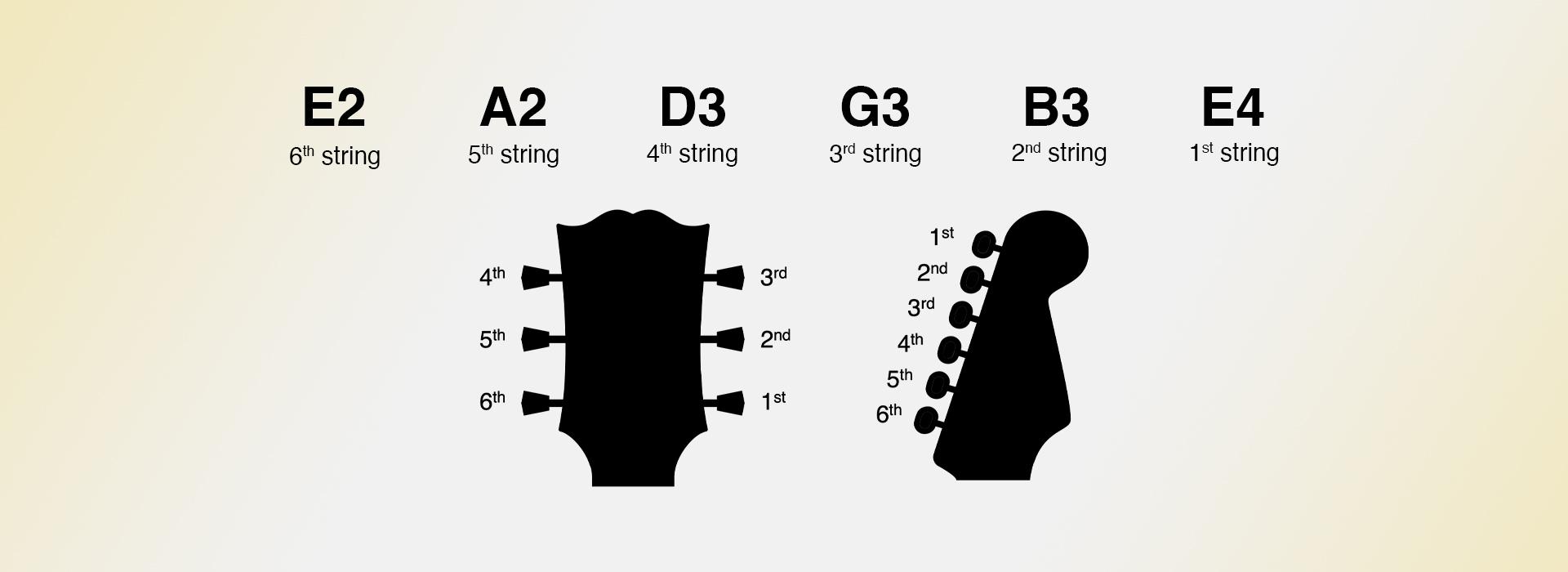
In 432 Hz tuning, the guitar strings (from lowest to highest) are:
E2 – 80.00 Hz
A2 – 108.00 Hz
D3 – 144.00 Hz
G3 – 192.00 Hz
B3 – 240.00 Hz
E4 – 324.00 Hz
These values are based on the alternative reference A4 = 432 Hz (instead of the standard 440 Hz).
About 432 Hz tuning
432 Hz tuning is standard tuning calibrated to an A4 = 432 Hz reference pitch, slightly lower than 440 Hz. Some players enjoy its subtly warmer, relaxed tone and feel.
Because the pitch is slightly lower, string tension can feel a bit looser, and careful tuning helps avoid over-tightening when switching back to 440 Hz calibration.
Tuner settings
You can customise the tuner to suit your environment and preferences. Adjust the A4 frequency to match different tuning standards (such as 432 Hz or 442 Hz). The confidence threshold improves detection precision, while the noise gate reduces background sounds for better accuracy. You can also choose your preferred display style, such as a meter or slider.